

How to Optimize URLs for SEO: A Comprehensive Guide
Get higher rankings and more organic traffic by optimizing your URLs.
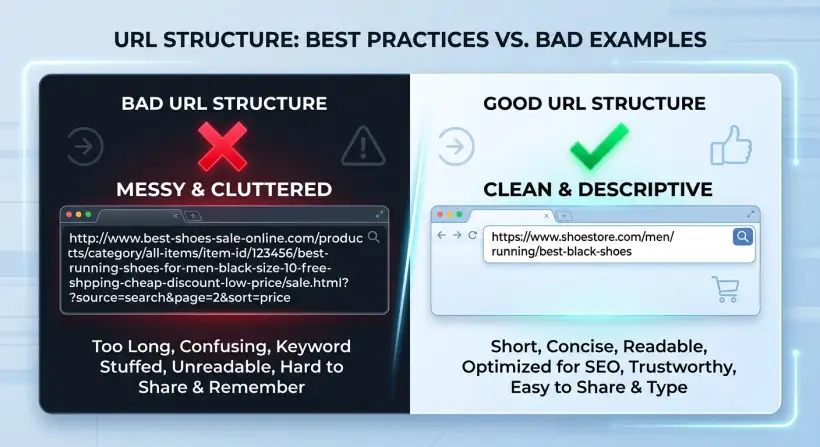
Do your website URLs hurt your search engine rankings? You might be surprised at the impact these short strings of characters have on your SEO.
Optimizing URLs is a key part of on-page SEO that many people miss. Do it right, and you can rank higher and get more clicks. Do it wrong, and you could lose valuable traffic.
This guide will show you how to create SEO-friendly URLs. They help search engines and users understand and value your content.
In search engine optimization (SEO), every detail matters. Everything from your content to the images you use helps your website perform. Your website's URLs are a key element. They are often underestimated in how search engines like Google rank your content. Creating good, SEO-friendly URLs is not just about looks. It is a strategic move that can improve your website's visibility and user experience. Following these strategies can make the difference between a successful website and one that struggles.
This guide explains how to optimize URLs for SEO. We will look at the key parts of a well-optimized URL, the best practices, and common mistakes. By the end, you will know how to create URLs that please search engines and improve the user experience. This will drive more organic traffic to your site.
Quick navigation
What Makes a URL SEO-Friendly?
An SEO-friendly URL works well for users and search engines. It gives clear and simple information about the page's content. This makes it easier for search engines to understand and rank your content correctly. But what makes a URL SEO-friendly? Is it just about keywords, or are there other things to consider?
Several key elements help create an SEO-friendly URL:
- Readability: URLs should be easy for users and search engines to read and understand. Avoid complex characters and keep the structure simple.
- Keywords: Including relevant keywords in your URLs helps search engines understand your page's topic. This improves your chances of ranking for those terms.
- Structure: A logical and organized URL structure that matches your website's layout helps users and search engines navigate your site.
- HTTPS: Using HTTPS (secured with SSL/TLS) is a ranking factor. It provides a secure connection for your website.
- Length: Keep URLs short and clear. Shorter URLs are easier to read, share, and understand.
By focusing on these elements, you can create URLs that help SEO and improve the user experience. This leads to higher rankings, more organic traffic, and better user engagement on your website.
Keyword Optimization in URLs
Putting relevant keywords in your URLs is key to effective SEO. Search engines analyze URLs to understand each page when they crawl your site. Including target keywords in your URLs tells search engines what your content is about. This improves the chance that your page will show up in search results for those terms. But how do you include keywords without overdoing it?
Here’s how to optimize keywords in your URLs:
- Choose Relevant Keywords: Pick keywords that accurately describe your page's content. Use keyword research tools to find the terms your target audience uses.
- Include Keywords Naturally: Do not stuff your URLs with keywords. Add them naturally, making sure they fit with the page's topic.
- Place Keywords Strategically: The closer the keyword is to the domain name, the more impact it can have. Put your main keyword as early as possible in the URL.
- Avoid Keyword Repetition: Use each keyword only once in a URL to keep it clear and readable.
By following these strategies, you make sure your URLs tell search engines what your content is about. This boosts your SEO.
URL Length and Structure
The length and structure of your URLs affect how well they work. Search engines and users both benefit from URLs that are short, clear, and easy to understand. Long, confusing URLs can be hard to read, share, and remember. This can hurt your SEO. So, how do you balance giving enough information and keeping your URLs short?
Here’s what to think about when optimizing URL length and structure:
- Keep URLs Concise: Make your URLs as short as possible while still explaining the content. Shorter URLs are easier for users to understand and remember.
- Use a Logical Structure: Organize your URLs to match your website's layout. This helps search engines understand your site and makes it easier for users to navigate.
- Reflect the Content: Make sure the URL accurately describes the page's content. This helps users and search engines know what the page is about before they click on it.
- Avoid Unnecessary Parameters: Remove any unnecessary parameters or tracking codes from your URLs to keep them clean and simple.
Following these guidelines ensures your URLs are user-friendly, search engine-friendly, and improve your SEO.
Using Hyphens and Avoiding Special Characters
The characters you choose matter when creating URLs. Using hyphens correctly and avoiding special characters is key for readability and search engine optimization. Hyphens separate words in your URLs, making them easier to read and understand. Special characters can cause problems with indexing and user experience. What is the best practice for characters in your URLs?
Here’s how to use hyphens and avoid special characters:
- Use Hyphens to Separate Words: Use hyphens (-) to separate words in your URLs. This makes them easier to read for users and search engines. For example, use "how-to-optimize-urls" instead of "howtooptimizeurls" or "how_to_optimize_urls."
- Avoid Underscores: While underscores (_) can separate words, hyphens are better. Search engines often see underscores as joining words, which can make them harder to read.
- Avoid Special Characters: Do not use special characters such as question marks (?), ampersands (&), and other symbols. They can cause confusion and may not be correctly interpreted by all browsers or search engines.
- Use Lowercase Letters: Always use lowercase letters in your URLs. This avoids potential issues with case sensitivity. It can lead to broken links or indexing problems.
By following these guidelines, you create clear, user-friendly URLs that search engines can easily understand. This helps improve your SEO.
The Importance of HTTPS
In today's digital world, your website's security is very important. HTTPS helps build trust and improve search engine rankings. HTTPS, which stands for Hypertext Transfer Protocol Secure, makes sure that data sent between a user's browser and your website is encrypted and secure. But how does HTTPS specifically help your SEO?
Here’s why HTTPS is crucial for your SEO:
- Ranking Factor: Google says HTTPS is a ranking signal. Websites with HTTPS rank higher in search results.
- Security: HTTPS protects user data. It makes your website safer from cyber threats.
- Trust: A secure website tells users their information is safe. This builds trust and encourages them to use your content.
- User Experience: Modern browsers show a "secure" indicator for HTTPS sites. This increases user confidence and improves their experience.
Switching to HTTPS is not just a technical update. It is a strategic move that can greatly improve your website's visibility and build user trust. Search engine optimization relies on trust and security.
URL Optimization for Mobile
Mobile browsing is growing, so it is important to optimize your URLs for mobile users. Mobile optimization is a key part of a successful SEO strategy. But how can you optimize URLs to give mobile users a good experience?
Here’s how to optimize URLs for mobile users:
- Keep URLs Short and Simple: Mobile users often browse on small screens. It is important to keep URLs short and easy to read.
- Use Responsive Design: Make sure your website uses a responsive design that works on different screen sizes. This ensures the URLs look the same on all devices.
- Avoid Redirects: Use as few redirects as possible. They can slow down page loading times, especially on mobile devices.
- Test on Mobile: Regularly test your URLs on different mobile devices. Make sure they show up correctly and work as expected.
By following these strategies, you improve the user experience for mobile visitors. You also improve your website's overall SEO, especially with mobile-first indexing.
What this means for you
Optimizing URLs may seem like a small detail, but it can greatly affect your website's performance and success. Paying attention to your URLs' structure, readability, and keywords is a smart investment in your SEO. How can these URL optimization strategies help you?
Here’s what URL optimization means for you:
- Improved Search Rankings: Well-optimized URLs tell search engines what your page is about. This increases your chances of ranking higher in search results.
- Increased Organic Traffic: Higher rankings lead to more visibility, which brings more organic traffic to your website.
- Enhanced User Experience: User-friendly URLs make it easier for visitors to understand your content. This improves their overall experience on your site.
- Better Click-Through Rates: Clear, descriptive URLs can encourage users to click on your links in search results. This increases your click-through rates.
Investing time in optimizing your URLs helps your SEO. It leads to better search rankings, more traffic, and a more user-friendly website. It is like building the foundation for a successful online presence.
Risks, trade-offs, and blind spots
Optimizing URLs offers many benefits, but there are also potential risks, trade-offs, and blind spots. Knowing about these things can help you make good choices and avoid common mistakes. What are the possible challenges of URL optimization?
Here are some risks, trade-offs, and blind spots to be aware of:
- Keyword Cannibalization: Using too many similar keywords in multiple URLs can lead to keyword cannibalization. This is when different pages compete for the same search terms.
- Over-Optimization: Putting too many keywords in URLs can lead to penalties from search engines. This can lower your rankings.
- Redirect Issues: Changing URLs without using redirects can cause broken links. This negatively affects your SEO.
- Technical Errors: Incorrectly using HTTPS or creating structure problems with your URLs can lead to technical SEO issues.
By understanding these potential problems, you can optimize URLs more effectively. You can also reduce the risks. Following best practices, like choosing your keywords carefully, keeping your URLs short, and regularly testing your website, will help. This creates more effective, search engine-friendly URLs.
Main points
Optimizing URLs for SEO is a key part of a complete SEO strategy. From adding keywords to ensuring a logical structure and using HTTPS, each element helps improve your website's visibility and user experience. The small details of URL optimization can have a big impact on your search engine performance. Ready to improve your SEO?
- Prioritize Readability: Make sure your URLs are easy to read and understand.
- Use Relevant Keywords: Include keywords that accurately describe your content.
- Maintain a Logical Structure: Organize your URLs to match your website’s layout.
- Keep URLs Concise: Make your URLs short and descriptive.
- Use Hyphens: Separate words with hyphens for readability.
- Secure with HTTPS: Use HTTPS for security and to rank higher.
- Optimize for Mobile: Make sure your URLs are mobile-friendly.
By following these best practices, you can create URLs that improve your website's SEO and give users a better experience. Start optimizing your URLs, and watch your website climb in search engine rankings. Are you ready to see how these sustainability strategies will enhance your website?